In today’s rapidly evolving business landscape, staying ahead of the competition requires more than just a great product or service. It demands a deep understanding of the market, consumer behavior, and emerging trends. This is where the market research process becomes invaluable. In this blog post, we will delve more into market research and explore...
There is never a wrong time to do market research. However, most research projects are birthed because a company or organization is at a crossroads. Whether you’re a startup or Fortune 500 company, you’ll have critical decisions to make. This blog will detail common market research examples and how our clients have used them to...
Virtual focus groups are no longer a backup plan or a pandemic-era workaround.
For many brands, they are now a go-to qualitative research method because they make it easier to reach niche audiences, recruit across geographies, and gather rich feedback without the cost and coordination of an in-person session.
But the success of virtual focus groups depends on more than just getting people in a Zoom room.
In our experience conducting online focus groups, the real value comes from thoughtful recruiting, a strong discussion guide, skilled moderation, and a clear plan for turning conversations into usable insights.
Overview
Here are 14 of our favorite online focus group best practices we recommend.
Use a video platform participants already know, such as Zoom, Microsoft Teams, or Google Meet.
Let participants join from the device that is most convenient for them.
Plan for accessibility early so participants can fully engage in the discussion.
Recruit people who are not only qualified, but comfortable sharing in a group setting.
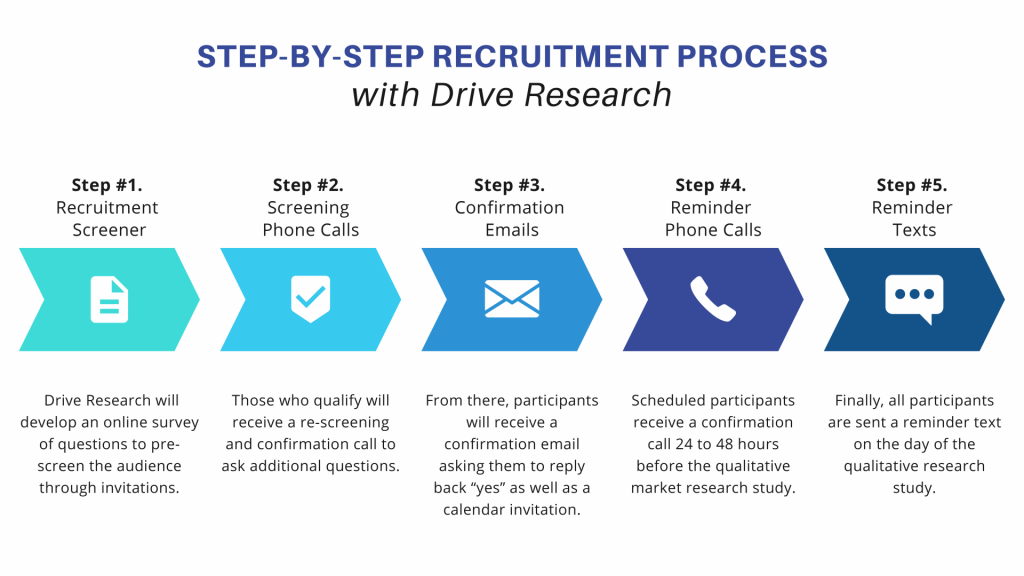
Keep communication personal throughout recruiting.
Send multiple reminders about the virtual focus group through different forms of communication.
Ask participants to join from a quiet, private space with minimal distractions.
Build in extra time before the session to handle technical issues.
Write a strong moderator’s guide before the session starts.
Keep the group size smaller than an in-person focus group (4-6 participants).
Call on participants by name to keep the discussion organized and engaging.
Aim to keep the sessions to 60-90 minutes long.
Send incentives within 48 hours after the group is complete.
Turn the discussion into clear findings, themes, and next steps after the session ends.
Need full-service virtual focus group support? Drive Research can help.
A virtual focus group is a moderated group discussion conducted through an online meeting platform such as Zoom, Microsoft Teams, or Google Meet.
A trained moderator leads the conversation, asks follow-up questions, and helps a small group of targeted participants react to ideas, experiences, products, messaging, or concepts in real time. Other common terms for virtual focus groups include online focus groups, remote focus groups, and online group discussions.
How Online and In-Person Focus Group Best Practices Differ
Virtual and in-person focus groups share the same goal: creating a setting where participants feel comfortable sharing honest, detailed feedback.
The true difference is in how the session needs to be managed.
In-person groups give moderators more control over the environment and often make it easier to read body language and manage larger groups.
Virtual groups require more attention to platform choice, reminders, technical setup, and participant engagement. They also tend to work better with smaller groups to avoid people talking over one another.
The right format depends on the audience, topic, and research goals.
Our focus group company finds that in-person may be better for physical product interaction, while virtual is often the better choice for convenience, speed, and geographic reach.
Best Practices for Online Focus Groups
#1: Use a virtual focus group platform participants already know
Video-based communication is now a normal part of everyday work life. Pew Research reported that 43% of workers say they have a hybrid schedule, which helps explain why many participants are already comfortable joining structured conversations online.
One of the easiest ways to improve the participant experience is to choose a platform that feels familiar. If people already know how to join, unmute, turn on their camera, and use the chat, you remove a lot of unnecessary friction before the discussion even begins.
Today, that usually means sticking with well-known tools like:
Zoom: Includes features that support research sessions well, such as waiting rooms, screen sharing, recording, and live captions. Zoom states that meetings and webinars automatically provide live captioning.
Microsoft Teams: A strong option for B2B studies, especially when participants already use it at work. Teams also offers live captions and transcription features that can be useful for accessibility and post-session review.
Google Meet: A practical option for audiences already working in Google Workspace. Google notes that Meet includes built-in accessibility features such as captions, keyboard shortcuts, and video pinning.
The best platform is not always the one with the most features. It is the one that creates the least friction for your target audience.
#2: Let participants join from the device that works best for them
Some participants will join from laptops. Others will use tablets or phones.
You can shoot yourself in the foot by limiting participation to those who only have a laptop. So, unless your session depends on viewing highly detailed stimuli, it usually helps to allow mobile participation.
We often recommend setting expectations in advance by…
Asking participants to fully charge their device
Using headphones if possible
Joining from a strong internet connection
That small amount of prep can prevent a lot of avoidable issues.
#3. Make accessibility part of the focus group planning process
Accessibility should be considered from the beginning, not added at the last minute. The easier it is for participants to join, follow along, and engage comfortably, the better the discussion tends to be.
This can be as simple as choosing a platform with captions, keeping any on-screen materials easy to read, using clear instructions, and asking ahead of time whether anyone needs accommodations.
Small details like these can improve both the participant experience and the quality of feedback you collect.
#4. Recruit participants who will actively contribute
When we recruit for virtual focus groups, we are not just checking demographic or behavioral boxes.
We are also listening for signs that someone will be an active participant once the session begins. That can include…
How clearly they answer questions during the screening call
Whether they are willing to elaborate when probed for follow up
Whether they seem comfortable sharing their perspective in a group setting
A participant may qualify on paper, but if they give one-word answers, seem distracted, or show little interest in the discussion, they may not be the right fit for a remote focus group.
The goal is to recruit people who are both eligible and likely to contribute meaningful feedback. 🎯
Confirmation emails, reminder texts, and phone calls should sound like they are coming from real people, not from an automated system that blasts out generic instructions.
That more personal touch builds trust and reduces no-shows. It also helps participants feel more comfortable asking questions before the session begins.
CTA: Partner with Drive Research for your next virtual focus group study.
Partner with Drive Research for your next virtual focus group study.
#6. Remind participants of the virtual focus group more than once
Virtual focus groups ask participants to show up at a specific time, log into the right platform, and be ready to engage for the full session.
That is a bigger commitment than clicking through a survey, so reminders play an important role in protecting attendance.
In our experience, one reminder is rarely enough. People get busy, forget appointments, miss emails, or simply need a quick nudge as the session gets closer.
A better reminder process is to…
📧 Send a confirmation email when someone is scheduled
📅 Share a calendar invitation they can save
☎️Make a reminder call or send an email the day before
📲 Send a short text the morning of the session
That is the exact process our qualitative recruiting firm follows – and it works! It has helped us achieve an average 95% show rate for virtual focus groups.
T#7. Ask participants to join from a quiet, private space
This is one of the most important virtual focus group best practices, and it still gets overlooked.
People are more candid when they are not worried about being overheard. Private spaces also reduce distractions from pets, kids, coworkers, TVs, and phone notifications.
It does not need to be perfect. A home office, bedroom, basement, or parked car can all work. The goal is privacy, comfort, and focus.
#8. Build in a buffer for tech issues
No matter how well you plan, someone will forget their password, need to update the app, or have connection issues.
That is why we typically ask participants to log in 5 to 10 minutes early.
It gives the moderator or support staff time to troubleshoot before the discussion officially starts.
Building in that extra time helps protect the full session and keeps technical hiccups from cutting into the conversation.
#9. Build a strong moderator’s guide before the session starts
A strong virtual focus group should feel conversational, but that does not mean it should be unstructured. The best sessions usually have a clear plan behind them, even when the discussion feels natural at the moment.
That is where a moderator’s guide comes in.
A moderator’s guide is the discussion roadmap for the session. It outlines the topics to cover, the order of questions, suggested probes, and how the moderator should move from one section to the next.
A moderator’s guide helps to:
Keeps the session focused
Ensures the discussion flows logically
Helps the moderator balance warm-up questions, core objectives, probes, and wrap-up
Without that structure, it becomes much easier for the group to go off course or for important focus group questions to get rushed at the end. A strong guide helps turn a broad conversation into feedback that is actually useful.
In a traditional facility setting, you might recruit 8 to 10 people for a discussion. In a virtual setting, that is often too many.
People talk over each other more easily online, and it becomes harder for the moderator to manage airtime.
For most online focus groups, we recommend aiming for about 4 to 6 active participants.
That is usually enough diversity of opinion without sacrificing depth.
#12. Aim to keep the sessions to 60-90 minutes long
As for session length, most virtual focus groups work best in the 60 to 90 minute range.
That is usually enough time to move beyond surface-level reactions and explore the topic in a more meaningful way, while still being short enough to keep participants engaged on screen.
The right length depends on what you need to cover.
A 60-minute virtual focus group is often a good fit when:
The topic is relatively focused
The goal is to gather quick, directional feedback
There is only one concept, message, or stimulus to review
You want a lower time commitment for participants, which can sometimes help reduce incentive costs
A 90-minute virtual focus group is often a better fit when:
The discussion includes several concepts or stimuli
The topic is emotionally sensitive or more nuanced
You want more time for probing and follow-up questions
It is important to explore differences in opinion without rushing the conversation
#13. Pay incentives quickly (no more than 48 hours)
The best practice is to send incentives within 24 hours whenever possible. At most, participants should receive payment within 48 hours of the session.
This may sound like a small operational detail, but it can have a real impact on both the participant experience and your long-term recruiting success.
It also helps to be clear about payment timing at several points throughout the process, not just after the session ends.
We recommend setting expectations…
During recruiting
Mentioning it again at the beginning of the online focus group
Reinforcing it one last time before participants log off
That way, everyone knows when to expect their incentive and there is less room for confusion or follow-up questions.
#14. Turn the discussion into clear findings and next steps
Once the group is over, the next step is organizing what you heard into usable findings. That usually includes reviewing the recording, transcript, and notes.
A strong report does more than summarize comments. It explains what the feedback means for the business.
At Drive Research, we typically look for:
Repeating themes across participants
Meaningful differences by segment
Standout quotes that bring findings to life implications
Recommended next steps
That final piece is important. Research becomes much more valuable when the reporting clearly points to what should happen next.
From recruiting to reporting, Drive Research manages virtual focus groups.
Common Virtual Focus Group Problems and How to Handle Them
No methodology is perfect. Virtual groups come with their own friction points, but most are manageable if you plan for them.
Zoom fatigue or screen fatigue
Keep the guide focused, remove unnecessary questions, and resist the temptation to cram too much into one session. If the audience is likely to tire easily, a tighter 60-minute agenda may be better than stretching to 90.
Distractions in the participant’s environment
Set expectations in recruiting and reminders. Ask participants to join from a private, quiet space and mute phone notifications before the discussion starts.
Participants talking over one another
This is where moderation matters. Use names, invite one person at a time to respond, and do not be afraid to gently step in when multiple people start speaking at once.
Technical issues
Build in an early login window, have a backup contact method like text or phone, and make sure someone on the team can troubleshoot while the moderator stays focused on the group.
Drive Research is a full-service market research company that supports virtual focus groups from end to end, including recruiting, moderation, analysis, and reporting.
If you are exploring virtual qualitative research and want help designing the right approach, our team would be happy to talk through your audience, goals, and timeline.
What is the best platform for a virtual focus group?
The best platform is usually the one your participants already know and can join easily. Zoom, Microsoft Teams, and Google Meet are all common options.
How many people should be in a virtual focus group?
In most cases, 4 to 6 participants is the sweet spot. It gives you enough diversity of feedback while still allowing each person time to speak.
How long should a virtual focus group last?
Most virtual sessions run 60 to 90 minutes. Shorter discussions can work for narrow topics, while more complex conversations often need the full 90 minutes.
Are virtual focus groups cheaper than in-person focus groups?
They often are, because there is no facility rental or travel involved. That said, recruiting, incentives, moderation, and reporting still affect the total budget.
Are online focus groups as effective as in-person groups?
They can be extremely effective, especially for concept testing, messaging feedback, customer experience research, and discussions where geography matters. In-person may still be better when physical product interaction or in-room observation is central to the study.
We analyze more than data—we also track how our site is used to improve your experience. Cookies help us understand what’s working so we can deliver the most relevant insights. Click “Accept” to enable full functionality.
Functional
Always active
The technical storage or access is strictly necessary for the legitimate purpose of enabling the use of a specific service explicitly requested by the subscriber or user, or for the sole purpose of carrying out the transmission of a communication over an electronic communications network.
Preferences
The technical storage or access is necessary for the legitimate purpose of storing preferences that are not requested by the subscriber or user.
Statistics
The technical storage or access that is used exclusively for statistical purposes.The technical storage or access that is used exclusively for anonymous statistical purposes. Without a subpoena, voluntary compliance on the part of your Internet Service Provider, or additional records from a third party, information stored or retrieved for this purpose alone cannot usually be used to identify you.
Marketing
The technical storage or access is required to create user profiles to send advertising, or to track the user on a website or across several websites for similar marketing purposes.